Invite Your School
Use the resources below to invite your school community to use Class Retriever.
Sample message to your community:

Hello [insert your school name here] community!
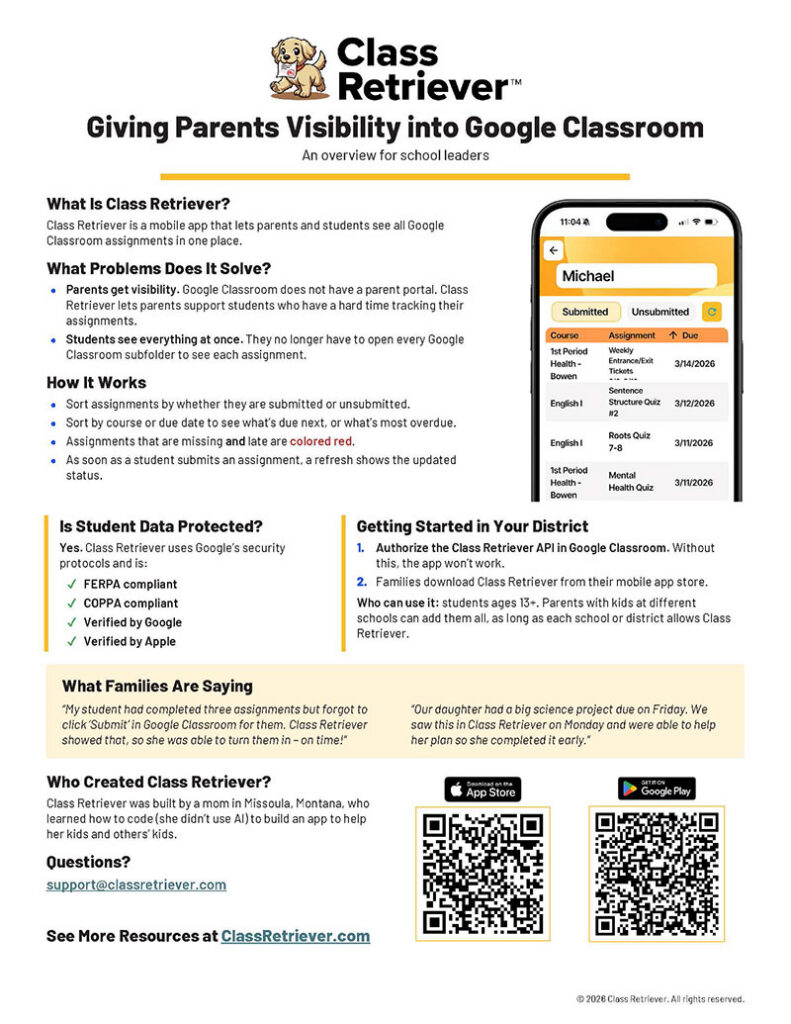
We are thrilled to announce a new app called Class Retriever. It will allow you to see your student’s assignment due dates and submission status in Google Classroom. It also gives your student one convenient screen to see all their assignments, without having to page through each class to see what’s due.
Do you want to…
- Know what has been assigned?
- Confirm an assignment has been submitted?
- Sort assignments by upcoming due dates?
- See what’s late?
Class Retriever closes that gap!
No more guessing or peering over your student’s shoulders to see whether something has been turned in, if it’s late, or if it’s missing.
Watch an introductory video here.
Start using Class Retriever today:
- Download the app from the Apple app store or Google Play.
- Add your student(s) using their name and school email address.
- Have your student scan the QR code that appears on your screen and follow the instructions. *
- Start retrieving!
* Please note:
- Your student will have to approve Class Retriever’s access to their Google Classroom assignment data, so you will want to have your student with you when you create your account.
- Your student should have a mobile device – their phone or a Chromebook for example – and be logged into their school email account on that device so they can approve your access via a QR code during set-up.
- To ensure compliance with student data privacy laws, Class Retriever is only supported for use with students who are ages 13+.
- Class Retriever is not just for parents and guardians. It’s also useful for students who would like to see all of their Google Classroom assignments on one screen.
Contact support@classretriever.com with any questions.
Copy/paste the message above or download one of these:
Logo